Kajabi vs Wix: Differences, Similarities, and Which Platform Fits Your Business
Kajabi and Wix serve different core purposes: Kajabi is an all-in-one platform built for selling online courses, memberships, and digital products, while Wix is a flexible drag-and-drop website builder designed for many site types (including eCommerce). Kajabi includes built-in course creation plus marketing automation and subscription billing in one ecosystem, whereas Wix often relies on apps/add-ons for comparable course functionality but offers broader design control and strong SEO tooling. In pricing terms, Kajabi plans start at $143/month with a 14-day free trial, while Wix has a free plan and premium plans starting around $17/month, with many advanced features gated behind upgrades and paid add-ons.
- 🎓 Course-first platform: Kajabi is built for courses, memberships, and creator funnels, with email and automations designed around learning products.
- 🖌️ Website design flexibility: Wix is a general website builder with true drag-and-drop control, broad templates, and a large app ecosystem.
- 💰 Pricing and fees: Kajabi starts at $143/month with a 14-day trial and 0% platform transaction fees; Wix starts around $17/month (plus standard processing fees and possible add-ons).
- 📝 Content vs. delivery: Wix is stronger for blogging and SEO-led content growth, while Kajabi includes unlimited Wistia-powered video hosting for course delivery.
- 🔗 Automation options: Both can connect to third-party tools; Zapier makes it practical to sync leads, purchases, and customer data across Kajabi and Wix.
Kajabi vs. Wix: Core Differences & Similarities
Kajabi is purpose-built for courses, memberships, and marketing automation, while Wix is a general website builder with stronger design flexibility and a more comprehensive native eCommerce toolset. Both are no-code, user-friendly platforms and both support integrations and automation (including third-party workflow tools).
When comparing Kajabi and Wix, the fastest way to decide is to look at what each platform is optimized to do. Kajabi is designed for knowledge entrepreneurs who need course delivery, membership management, email campaigns, and automation in one place. Wix is designed for broad website creation—business sites, portfolios, blogs, and online stores—using a highly visual drag-and-drop editor.
There is overlap: both let you publish a professional website, connect payments, and integrate third-party tools. The difference is that Kajabi’s center of gravity is learning products and recurring memberships, while Wix’s is flexible site design and a wide feature marketplace.
| Category | Kajabi | Wix |
|---|---|---|
| Best for | Online courses, coaching, memberships, digital products | General websites, brands, services, content sites, online stores |
| Course creation | Built-in course builder and learning delivery | Typically requires add-ons for robust course features |
| Design approach | Streamlined templates focused on education funnels | Drag-and-drop builder with extensive customization |
| Automation | Built-in marketing automation with triggers/actions | Automation available; advanced needs often handled via apps/third-party tools |
How do Kajabi and Wix compare overall?
Kajabi generally wins when your business model depends on learning experiences, gated content, and recurring subscriptions—because the coaching/membership/course components are native and tightly integrated with email marketing and funnels. Wix tends to win when your priority is a highly customized marketing site or store, and you want maximum visual control plus an ecosystem of apps to extend functionality.
In workflow terms, Kajabi is closer to an all-in-one operating system for creators. Wix is closer to a flexible site builder you can assemble into many types of businesses, sometimes requiring extra integrations to reach the same depth for eLearning.
What are the core features of Kajabi and Wix?
Kajabi’s core is eLearning and monetization: course building, membership management, communities, email campaigns, and marketing automation. Wix’s core is site creation and growth: drag-and-drop pages, mobile-responsive templates, eCommerce capabilities, and strong SEO controls.
If you’re mapping features to a no-code stack, Kajabi often reduces the number of external tools you need for course marketing. Wix often increases design flexibility and site variety, but may require more app choices and configuration.
Website Building Capabilities
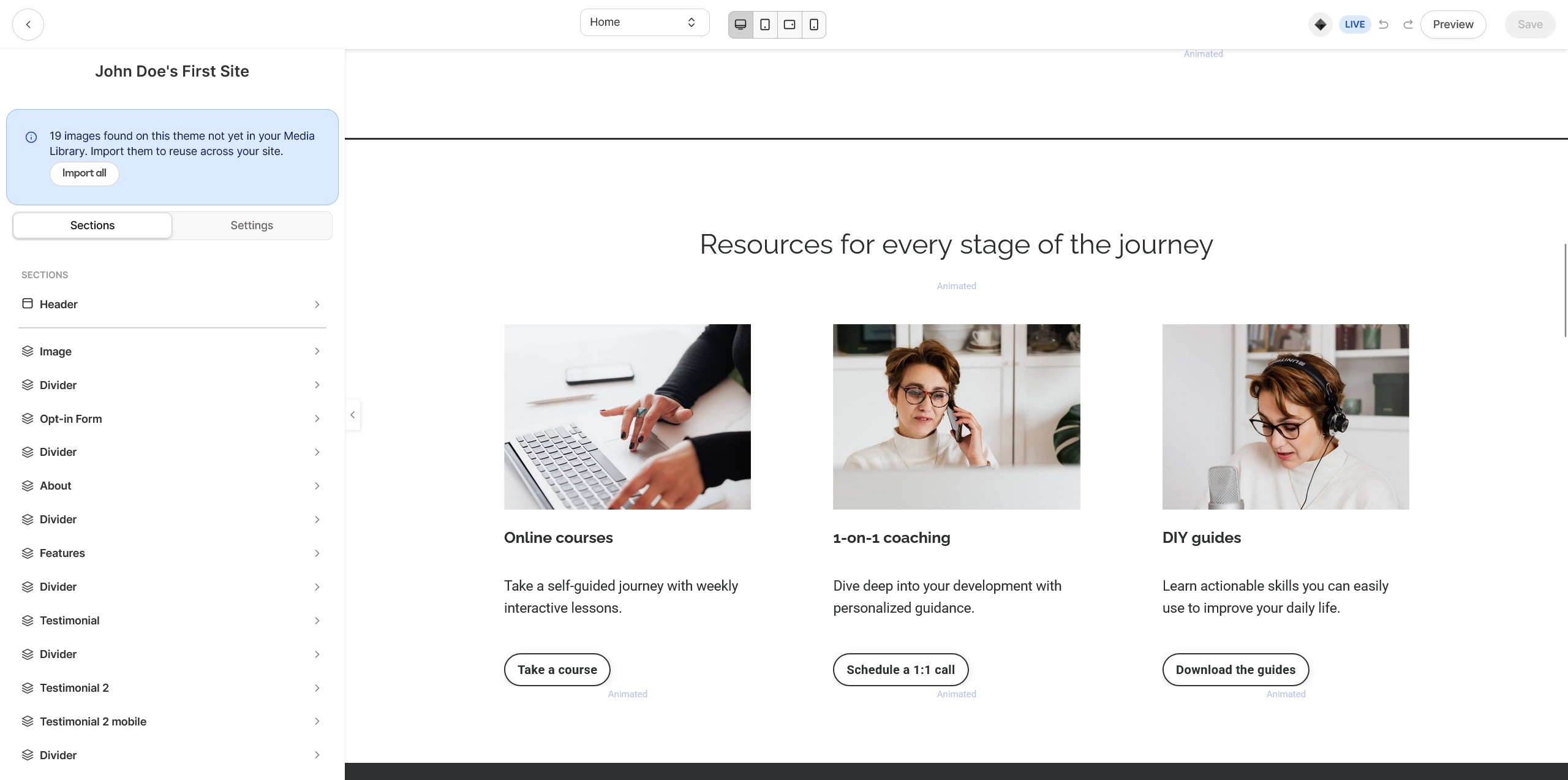
Wix is a general-purpose site builder with a highly customizable drag-and-drop editor, while Kajabi’s website builder is designed to support landing pages, course funnels, and membership experiences with a more unified structure. Both are no-code, but they optimize for different end results.
Both platforms let you launch a modern website quickly, but their builders reflect their primary audiences. Wix is built to handle almost any kind of site layout. Kajabi is built to keep your course pages, offers, checkout, and member areas consistent—so the website is part of the learning business workflow.
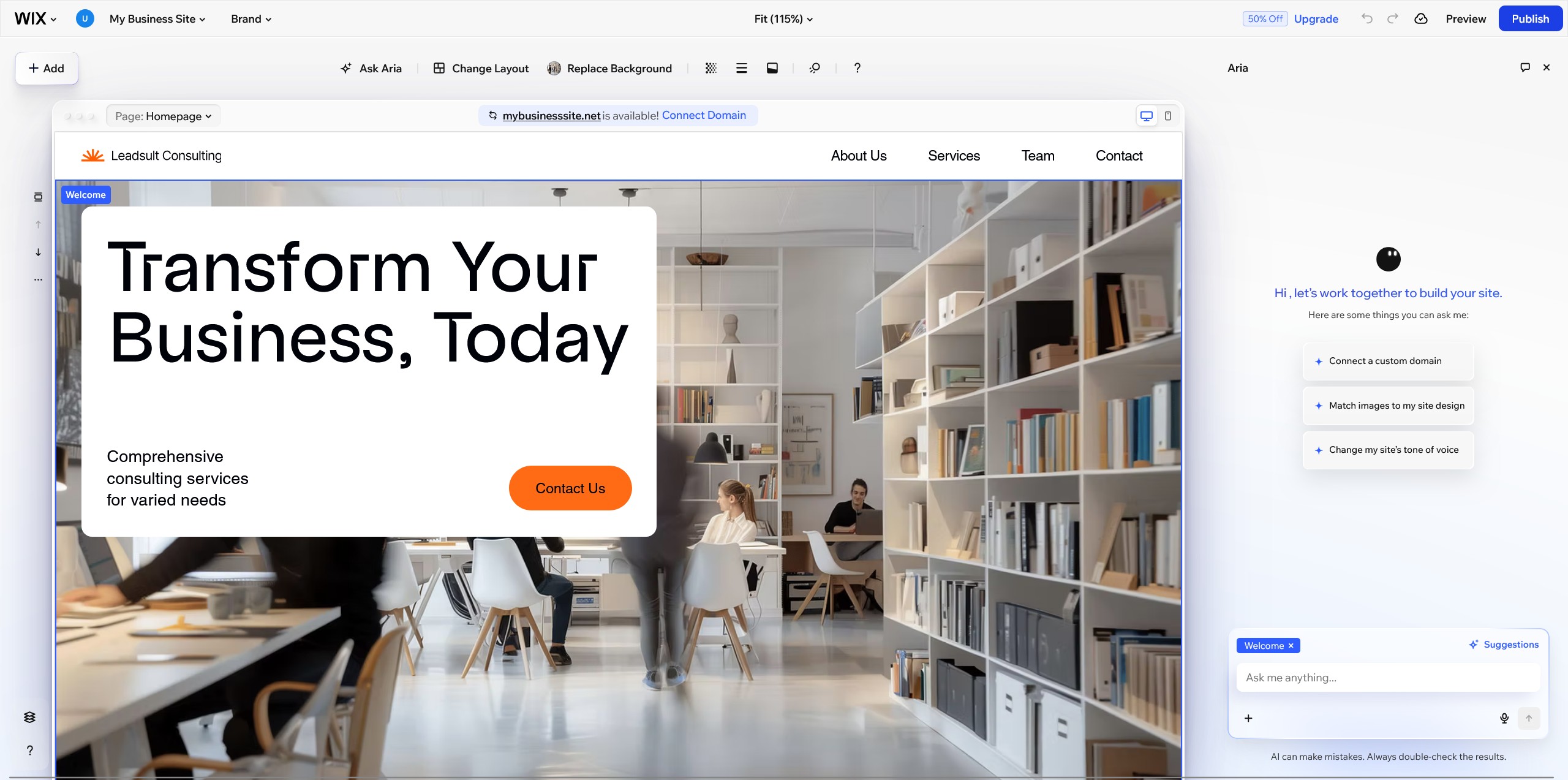
Wix’s Drag-and-Drop Editor
Wix’s drag-and-drop builder stands out because you can place elements exactly where you want them without coding, then iterate visually—page by page. This makes it easy to build a unique layout, test sections, and create highly branded pages even if you’re not a designer.
For teams that think in visual workflow terms, Wix’s editor feels closer to designing in a canvas: add sections, move blocks, adjust spacing, and refine page structure rapidly.
What website building features does Kajabi offer?
Kajabi’s website features focus on conversion and delivery: customizable landing pages, course pages, and member experiences, plus integrated payments for subscriptions and offers. The goal is to keep the journey from “visitor” to “lead” to “customer” to “member” inside one platform.
Kajabi typically provides fewer templates than Wix, but they’re designed around educational themes and funnel consistency—useful when you want a cohesive look across pages tied to your program and checkout flow.
How do mobile-responsive templates differ between Kajabi and Wix?
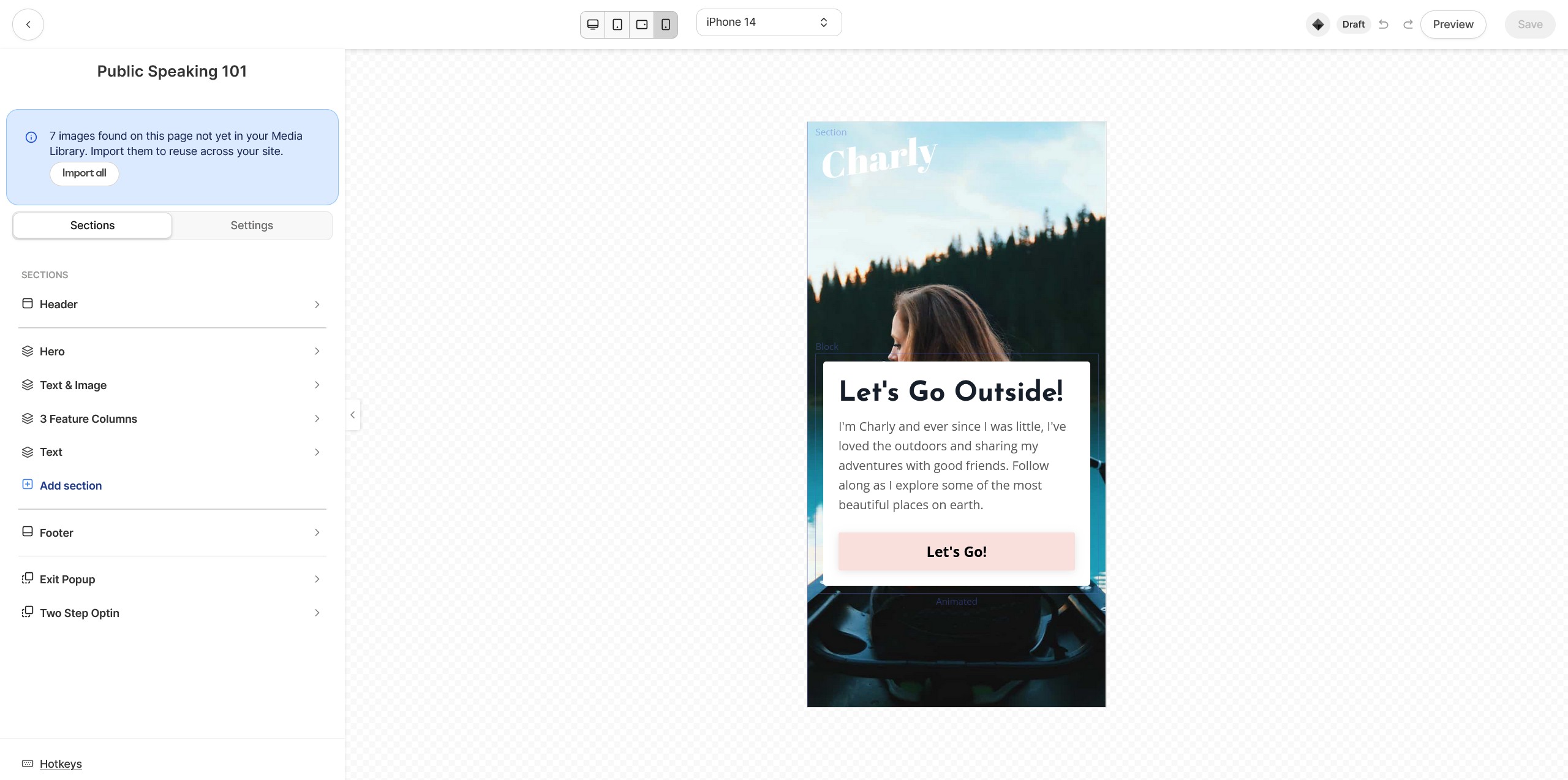
Wix offers a wide range of mobile-responsive templates that automatically adapt across screen sizes, which is useful if you’re building many types of pages and want design variety. Kajabi also provides responsive designs, but the layouts are more oriented toward lesson consumption, member navigation, and educational content delivery.
If mobile-first branding is your top priority, Wix’s template breadth can be an advantage. If mobile lesson experience and member usability are the priority, Kajabi’s structure can reduce friction for students.
How do design and customization options differ in Kajabi and Wix?
Wix provides broader creative freedom with advanced design capabilities and extensive templates, while Kajabi’s customization is strongest within course, membership, and funnel-oriented layouts. Choose Wix for maximal page-level control; choose Kajabi for education-first consistency.
Design needs vary by business model. For a brand that lives and dies by visual differentiation (agencies, creators, local services), Wix’s flexibility is often the deciding factor. For educators and membership owners, Kajabi’s opinionated structure can be beneficial because it keeps the learning experience cohesive.
What advanced design features does Wix provide?
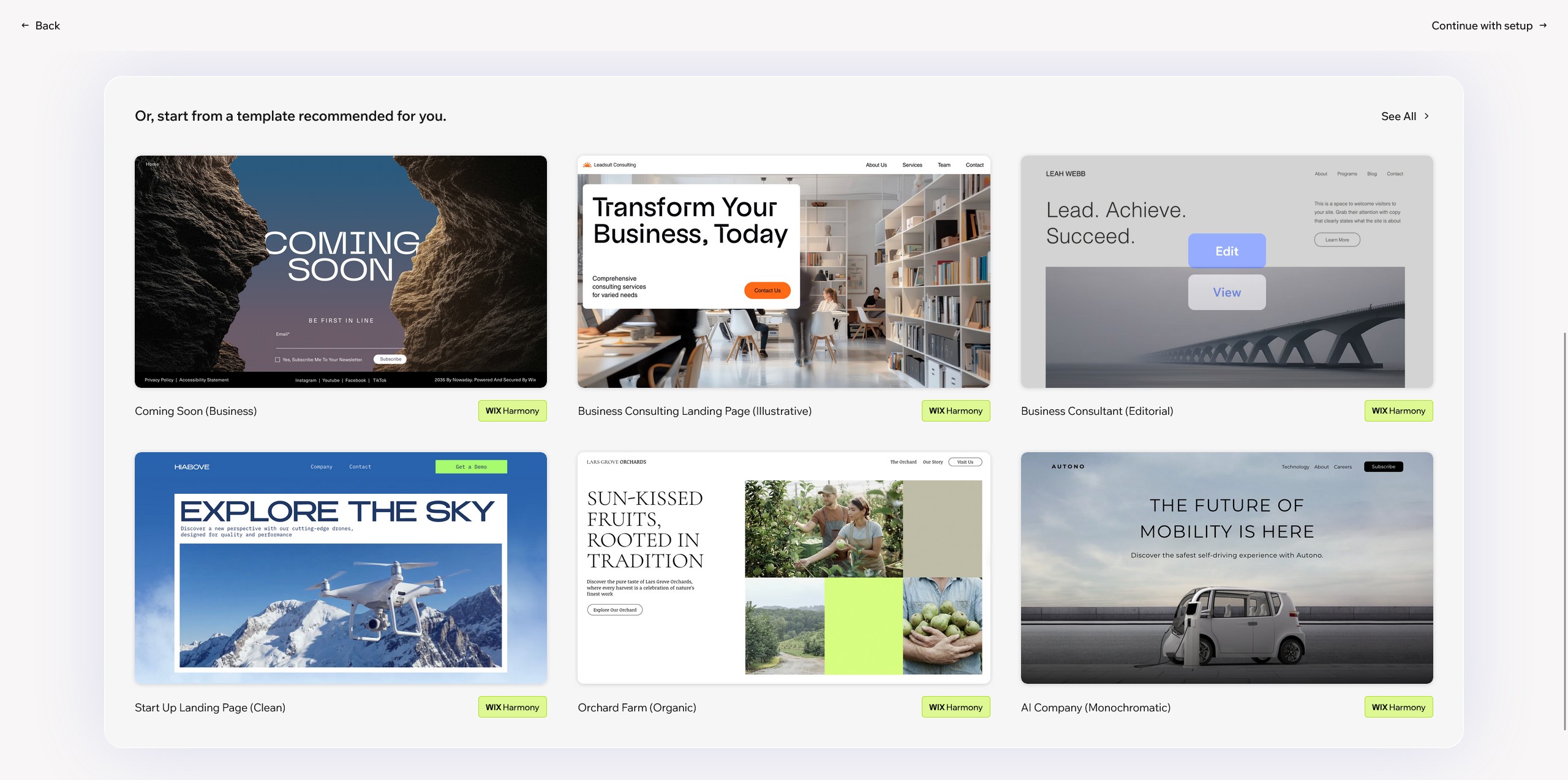
Wix offers hundreds of templates and deep page customization, allowing you to fine-tune sections, embed apps, and build dynamic experiences. Its strength is letting you translate a brand identity into a website without custom code.
This matters when your site needs more than standard landing pages—like complex navigation, unique page compositions, or content-heavy sections.
How customizable is Kajabi?
Kajabi is customizable, but the customization is targeted: course layouts, membership areas, landing pages, and branded funnels. You can tailor templates to match your brand and you can add custom pages, but you typically won’t get the same “anything goes” page-by-page freedom that Wix is known for.
In practice, this is a trade-off: less design sprawl, more consistency across the parts of the site that impact learning and sales.
eCommerce and Payment Processing
Kajabi focuses on selling subscriptions, courses, and digital offers with integrated payment and offer management, while Wix offers a broader native eCommerce system for product catalogs, carts, and store operations. Your choice depends on whether you’re selling learning products or running a traditional online store.
For Kajabi and Wix comparisons, payment processing is where the platforms diverge most clearly. Kajabi is designed around monetizing programs: one-time purchases, payment plans, and recurring subscription billing tied directly to access. Wix is designed around store mechanics: product listings, carts, checkout flows, and sales tracking.
What eCommerce features does Wix include?
Wix includes a full eCommerce toolkit for selling online, including product listings, shopping cart functionality, payment gateway connections, and analytics to track performance. It supports both physical and digital products, which makes it a fit for many business types.
One practical consideration: some eCommerce capabilities may depend on your plan level or paid add-ons, which can affect total cost as your store becomes more sophisticated.
How does Kajabi manage payments and offers?
Kajabi’s offer management is built around courses and memberships: you create offers, connect them to products, and monetize with subscription billing, one-time payments, or payment plans. This tight integration reduces the need for separate LMS (Learning Management System) plugins and keeps access control aligned with what a customer buys.
Kajabi’s built-in approach also avoids platform transaction fees, giving creators more direct control over monetization mechanics. By contrast, Wix Payments charges standard processing fees.
Marketing, Automation, and SEO Tools
Kajabi is stronger for built-in marketing automation (email campaigns, funnels, triggers/actions), while Wix is stronger for SEO configuration and site visibility tooling. If your growth depends on automated course marketing, Kajabi is often simpler; if organic search and content-led traffic are central, Wix is often more flexible.
Kajabi’s marketing suite is designed to move leads through an education sales journey—opt-ins, nurture, offers, and member onboarding—using automation sequences. Wix supports marketing and automation too, but is widely recognized for its SEO tooling that helps pages rank through structured on-page controls.
What SEO tools are available with Wix?
Wix provides SEO features such as customizable meta tags, image alt text controls, and guided setup via an SEO wizard. These tools help you implement baseline technical and on-page SEO without requiring a developer.
For businesses building multiple service pages, blog content, and location pages, these controls make it easier to standardize optimization across the site.
How does Kajabi handle marketing automation?
Kajabi includes a marketing automation suite for email marketing and automated workflows that respond to user behavior. You can set up triggers and actions around events like form signups, purchases, or engagement steps, then route people into sequences and funnels.
This is particularly useful when your product is a journey (course/coaching) and you want automation to handle onboarding, upsells, and retention without stitching together many external tools.
Blogging and Video Hosting
Content delivery is a major differentiator. Wix features a robust, native blogging engine ideal for driving organic search traffic. Kajabi’s blogging features are much more basic. However, Kajabi includes unlimited, built-in video hosting powered by Wistia, which is essential for course creators. Wix limits video storage depending on your premium plan tier, which can increase costs for video-heavy courses.
What integration and automation options are available with Kajabi and Wix?
Both Kajabi and Wix integrate with third-party apps, and you can automate cross-platform workflows using tools like Zapier by mapping triggers to actions. This enables no-code workflows such as syncing leads, sending notifications, and updating customer data.
Integrations matter most when you’re building a repeatable operating system: lead capture, email enrichment, CRM updates, customer support, and analytics. Wix typically offers a broad range of integrations via its app ecosystem. Kajabi offers fewer integrations but provides many core creator functions natively, reducing the number of external dependencies.
How can Kajabi and Wix be connected for AI-driven automation?
Kajabi and Wix can be connected through integration platforms such as Zapier, allowing you to automate tasks like moving form submissions into email lists or syncing customer records. The practical foundation of this AI-driven automation is consistent event data flowing between systems.
Once those workflows are in place, teams often add AI tools downstream (for example, summarizing incoming leads or categorizing requests), but the key enabler is reliable triggers and actions.
How to automate workflows between Kajabi and Wix using Zapier
Zapier connects Kajabi and Wix by letting you define a trigger in one platform and an action in the other. Follow these steps:
- Choose a trigger (Wix: form submission; Kajabi: purchase or opt-in).
- Choose an action (add a contact, send an email, update a spreadsheet/CRM).
- Map fields (name, email, product, offer, tags) so data stays clean.
- Test, then monitor for failures and update when forms/offers change.
How do analytics and insights differ between Kajabi and Wix?
Wix analytics center on website traffic, conversions, and sales tracking, while Kajabi analytics focus on course performance, student engagement, and marketing results. The best choice depends on whether you’re optimizing a website/store or a learning product.
Analytics should match what you’re trying to improve. If your KPI is traffic-to-lead or product conversion rate across many pages, Wix’s website tracking is the natural fit. If your KPI is lesson engagement, completion, and cohort outcomes (plus offer performance), Kajabi’s reporting is more aligned.
What website tracking analytics does Wix offer?
Wix provides analytics to monitor website performance, including visitor statistics, conversion rates, and sales data. This helps site owners understand which pages attract users, what channels convert, and where shoppers drop off in the funnel.
For eCommerce and service sites, this site-wide view can be more actionable than learning-specific dashboards.
What analytics features are available in Kajabi?
Kajabi analytics are oriented toward how customers interact with your products: engagement, course progress, sales performance, and marketing campaign impact. These insights help course creators refine content structure, improve offers, and adjust automation based on real user behavior.
This is especially useful when retention and completion drive referrals and renewals.
What compliance and security features do Kajabi and Wix provide?
Both Kajabi and Wix support key security and compliance needs, including GDPR-friendly practices, SSL protection, secure payment processing, and data safeguards such as encryption. The practical baseline is that both platforms aim to protect user data and transactions.
For most small and mid-sized businesses, the core expectation is: secure connections, secure checkout, and appropriate data handling. Both platforms provide SSL certificates and implement measures designed to keep websites and customer data protected.
How do security features compare in Kajabi and Wix?
Kajabi and Wix both use SSL and secure payment gateways, and both apply data security practices such as encryption to reduce risk. From an operator standpoint, the bigger difference is usually not “who has SSL,” but how many external apps you add—because each additional integration becomes another security and privacy consideration.
If you want to minimize third-party surface area for a course business, Kajabi’s all-in-one approach can reduce the number of connected tools you must govern.
How do pricing and subscription options compare for Kajabi and Wix?
Kajabi pricing is creator-centric and starts at $143/month with key features included and a 14-day free trial, while Wix offers a free plan and premium plans starting around $17/month but often requires paid add-ons for advanced needs. Total cost depends on whether you need course delivery, advanced eCommerce, or multiple app extensions.
Pricing is where many comparisons between Kajabi and Wix become apples vs oranges. Kajabi generally bundles the tools needed to sell and market learning products. Wix can start cheaper, but costs may rise as you add premium features, storage, eCommerce upgrades, or specialized apps.
How do the pricing plans of Kajabi and Wix differ?
Kajabi’s pricing structure is built around course creation and membership management, aiming to keep the core stack inside the platform. Wix’s tiering is based on website needs—general site features, storage, and eCommerce—while additional capabilities may be tied to upgrades or add-ons.
If you’re building a course business, the simplest way to compare is to list the external tools you would need with Wix (course hosting, membership gating, marketing automation) and include those costs alongside Wix’s plan.
| Cost factor | Kajabi | Wix |
|---|---|---|
| Entry price (per knowledge base) | $143/month | $17/month premium starting point + optional add-ons |
| Free option | 14-day free trial | Free plan available (limited) |
| Feature packaging | More all-in-one for courses/marketing | More modular; advanced features may require upgrades/apps |
What are the free trial and subscription billing options?
Kajabi offers a 14-day free trial so new users can test course building, offers, and automations before committing. Wix offers multiple subscription billing options depending on the plan you choose, commonly with monthly and annual payment choices.
To choose confidently, align the trial period with your test plan (build a landing page, connect payments, run an email workflow, and publish a minimal product) so you can validate fit quickly.
What community and support features are available in Kajabi and Wix?
Wix provides broad support resources and community spaces (forums and user groups), while Kajabi focuses community and support around creators—especially coaching-style engagement and member interaction. The difference is whether you want general website-builder support or education-business support built into the product.
Support needs are often determined by what you’re building. A Wix user may need design and site-structure troubleshooting across many use cases. A Kajabi user may need help setting up offers, automations, and member experiences that mirror a coaching program.
What community features does Wix offer?
Wix offers community resources such as forums, user groups, and help content designed to support website creation and management. This ecosystem is useful when you want ideas, templates, and troubleshooting help across many industries.
It’s especially valuable if you anticipate frequent design changes or are building multiple types of pages and site features.
How does Kajabi support coaching functionality and user support?
Kajabi supports coaching-style businesses through tools that help creators engage learners, deliver feedback, and provide a guided experience tied to products and memberships. Because the platform is oriented around education businesses, support resources often align with funnels, offers, automation sequences, and member journeys.
If your business model depends on ongoing interaction (coaching cohorts, memberships, or structured programs), Kajabi’s ecosystem is typically designed to keep that engagement close to the product itself.
Frequently Asked Questions
Does Wix integrate with Kajabi?
There’s no single “native” one-click connection, but you can integrate Wix and Kajabi using third-party automation tools (like Zapier) to pass data between them. Common setups include sending Wix form leads into Kajabi email lists or tagging Kajabi customers based on Wix actions.
Do I need a website if I have Kajabi?
Not necessarily—Kajabi can host landing pages, checkout, and member areas, which is enough for many course and membership businesses. You may still want a separate Wix site if you need a more complex marketing website (e.g., extensive pages, unique layouts, or a content-heavy brand site) alongside Kajabi delivery.
What are the pros and cons of Kajabi vs Wix for membership sites?
Kajabi is typically simpler for memberships because access control, recurring billing, and member experiences are built around that model. Wix can work for memberships, but you may rely more on apps and configuration, which can add complexity as you scale features and member journeys.
Does Wix support digital products like Kajabi does?
Yes—Wix can sell digital products, but it’s generally oriented around store-style selling rather than a structured learning experience. If your digital product is a course with lessons, progress, and member navigation, Kajabi is usually a more purpose-built fit.
Is Kajabi worth the higher cost compared to Wix?
It can be worth it if you’d otherwise pay for multiple tools to cover course delivery, email marketing, automation, and subscription access control. If your priority is a flexible website or online store and you don’t need an all-in-one course business system, Wix can be more cost-efficient.
Free Quiz: What's holding back your business growth?
Take this short quiz and discover your #1 growth blocker - so you know exactly where to focus next: