Kajabi vs WordPress: Which Platform Fits Courses, Memberships, and Marketing Best?
The choice between Kajabi and WordPress comes down to convenience versus customization. Kajabi is a managed, all-in-one platform that includes built-in course creation, email marketing, and funnels starting at $143/month. Meanwhile, WordPress is a highly customizable, self-hosted website builder, and while the software itself is free, building a course business requires purchasing separate hosting, premium LMS plugins, and marketing tools.
- 🔧 Platform Choice: Kajabi is ideal for those seeking an all-in-one solution for courses and marketing, while WordPress offers extensive customization for diverse website needs.
- 💸 Cost Structure: Kajabi's pricing is straightforward with a single subscription, whereas WordPress may appear cheaper but often incurs additional costs for hosting and plugins.
- 🔒 Maintenance and Security: Kajabi provides managed hosting and security, reducing user responsibility, while WordPress requires user-managed updates and security measures.
- 📈 Marketing Tools: Kajabi includes built-in marketing and sales tools, simplifying integration, whereas WordPress relies on third-party plugins for similar functionality.
- 🔄 Migration Considerations: Transitioning from WordPress to Kajabi involves manual migration, particularly for blogs, but can simplify tech stacks by consolidating tools.
Core Differences Between the Platforms
Kajabi is a hosted all-in-one platform for creating, marketing, and selling digital products, while WordPress is a flexible site builder that typically requires separate hosting plus plugins for courses, payments, and marketing.
The biggest difference is the operating model itself. Kajabi aims to reduce tool sprawl by bundling the core features most creators need into one subscription, while WordPress is an ecosystem where you mix and match components.
That distinction shapes everything else: setup time, ongoing maintenance, how updates are handled, and how predictable your monthly costs will be. To make the differences easier to scan, here’s a high-level comparison.
| Category | Kajabi | WordPress |
|---|---|---|
| Core approach | All-in-one platform (hosted) | Build-your-own (self-hosted or managed hosting) |
| Courses & memberships | Built-in course builder, progress tracking, memberships | Usually requires LMS + membership plugins |
| Marketing & funnels | Built-in email, automation, segmentation, funnels | Typically relies on plugins and third-party tools |
| Customization | Template-based, purpose-built for creators | Extensive via themes, page builders, and plugins |
| Maintenance | Managed updates/hosting/security | User-managed updates, backups, security hardening |
All-in-One Platform vs Customization
Kajabi is designed as an all-in-one platform: courses, landing pages, email marketing, and selling flows live in one interface. In practice, that means fewer integration points to configure and fewer plugin conflicts to troubleshoot.
WordPress excels when you want deep customization options. You can choose from thousands of themes and extend almost any feature with premium plugins, but you’re also responsible for selecting compatible tools and keeping them updated.
Use this rule of thumb if you’re deciding quickly:
- Choose Kajabi if you want one login for site + courses + marketing + sales, with minimal technical overhead.
- Choose WordPress if you need unique layouts, specialized functionality, or a site that isn’t centered on digital products.
- Expect more system design work on WordPress: hosting, caching, security, plugin stack, and ongoing maintenance.
SEO and Hosting Capabilities
Kajabi bundles managed hosting and performance optimization into the platform, which reduces the risk of configuration mistakes that can slow a site down. WordPress can rank extremely well, but results depend heavily on your hosting provider, theme quality, and SEO plugin setup.
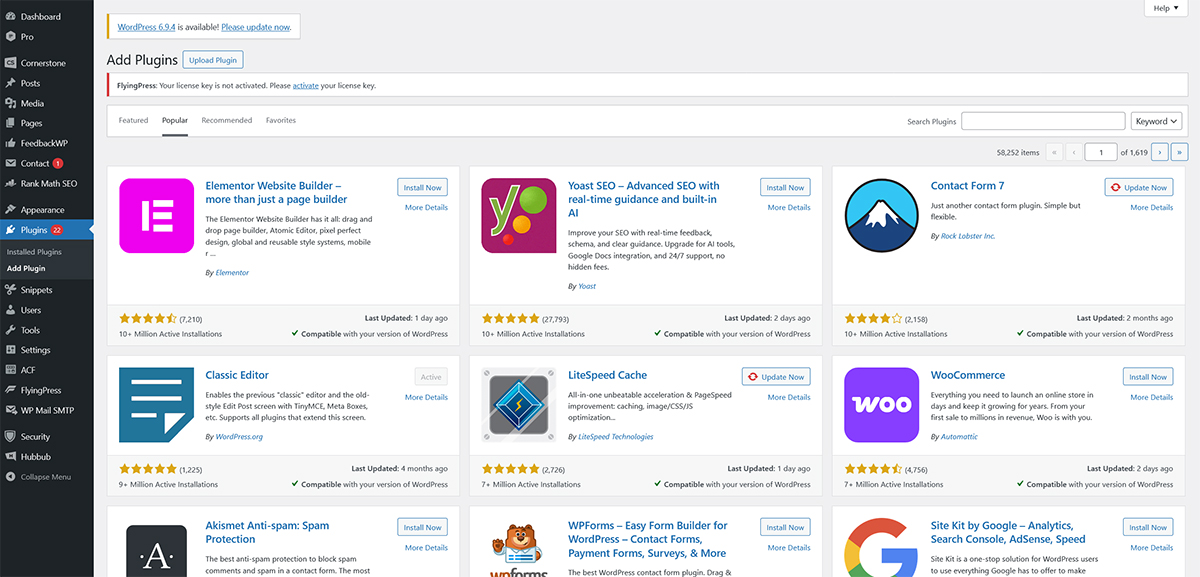
For hosting, Kajabi is hands-off: you don’t shop for servers or tune them. With WordPress, you can choose anything from budget shared hosting to high-performance managed WordPress hosting; that flexibility is powerful, but it also means server reliability and speed vary widely.
Kajabi’s templates are optimized for mobile out of the box. With WordPress, mobile responsiveness depends on your theme and any design customizations you add, so testing (and sometimes fixing) is part of the workflow.
Website Building and Design Flexibility
Kajabi prioritizes fast, guided website creation with templates for courses and digital products, while WordPress offers broader design freedom through themes, plugins, and custom development.
If your main goal is publishing a marketing site plus a course area with minimal setup, Kajabi’s website builder is intentionally streamlined. If your goal is a fully bespoke site with custom content types, unique navigation logic, and advanced design systems, WordPress is usually the better fit.
The trade-off is time and complexity: WordPress can do more, but you often need to decide how to do it (and maintain those choices). Kajabi narrows the options to reduce build and upkeep time.
Drag-and-Drop Interface vs Gutenberg Block Editor
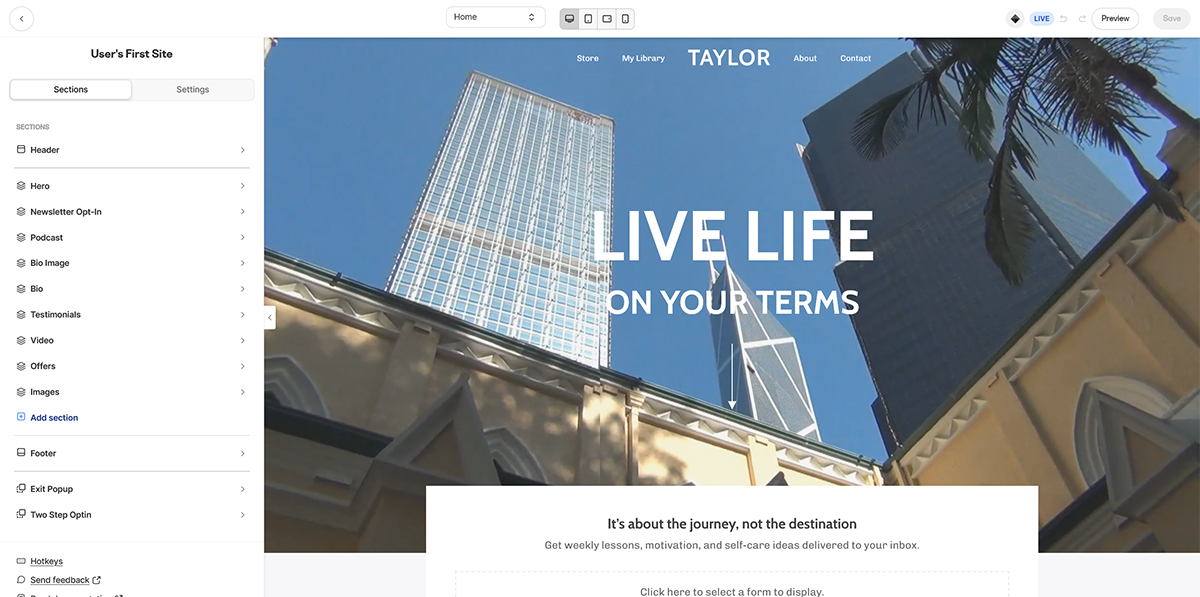
Kajabi’s drag-and-drop interface is designed for ease of use, especially for creators who don’t want to touch code. You can assemble pages quickly using prebuilt sections and layouts that map to common goals like opt-ins, webinar registration, and course sales pages.
WordPress’s Gutenberg block editor is flexible and powerful, but it can have a steeper learning curve, particularly once you add a theme framework or a page builder plugin on top. Many users end up mixing core blocks, theme blocks, and plugin blocks, which can complicate consistency.
Themes, Templates, and Visual Design Tools
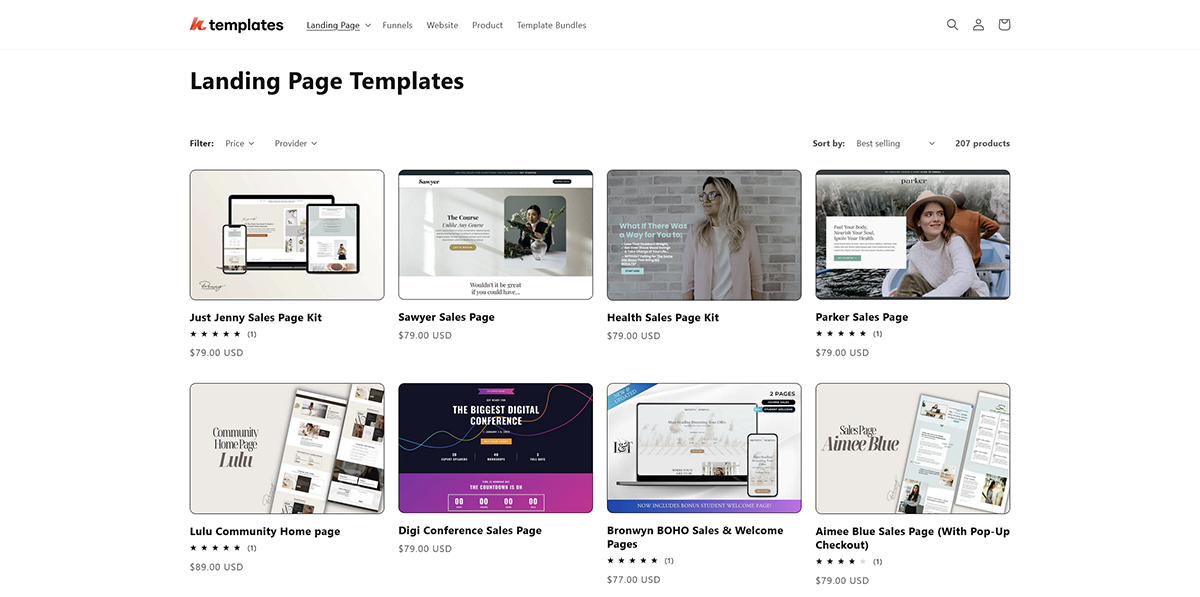
Kajabi provides templates tailored to knowledge entrepreneurs, such as site templates, landing page layouts, and product-centric page sections. That specialization speeds up launches, but it also means you’re working within a more defined design system.
WordPress has a massive theme ecosystem and relies on visual page builders like Elementor, Divi, or the native Gutenberg editor to design your storefront.
A practical way to decide: if you want your site to look like a high-converting course business quickly, Kajabi’s templates help. If you want a brand-first web experience with unique page types and layout rules, WordPress themes and builders offer more range.
Mobile Responsiveness and Optimization
Kajabi’s templates are mobile-responsive by default, reducing the amount of QA needed before launch. This is especially useful when you’re iterating on landing pages and sales pages frequently.
WordPress can be equally mobile-friendly, but outcomes depend on theme responsiveness, image handling, and speed optimization choices. If you add multiple plugins that load extra scripts, you may need to do additional tuning to maintain performance on mobile connections.
Regardless of platform, mobile optimization usually comes down to fundamentals:
- Use compressed images and avoid oversized media.
- Limit heavy animations and third-party script bloat.
- Test key pages (home, sales page, checkout, lesson pages) on real devices.
Course Creation and LMS Capabilities
Kajabi is purpose-built as an online course platform with a drag-and-drop course builder, assessments, and student progress tracking, while WordPress typically needs an LMS plugin stack to match those capabilities.
This is where Kajabi vs WordPress diverges the most. Kajabi’s core product experience is designed around creating modules/lessons, enrolling students, and tracking learning progress, with tools that work together without extra integrations.
WordPress can absolutely power sophisticated online courses, but you’ll usually assemble the experience from multiple vendors, which is great for customization but less ideal for simplicity.
Kajabi includes built-in tools that many creators would otherwise buy separately: a drag-and-drop course builder, support for multimedia lessons, student assessments, and progress tracking. It also supports learning on mobile with a dedicated student app experience, which can increase course completion for some audiences.
With WordPress, robust course delivery requires a dedicated LMS plugin like LearnDash, LifterLMS, or Tutor LMS, often paired with a membership tool like MemberPress. While this allows you to tailor the learning experience, it requires configuring multiple moving parts.
Monetization and Payment Gateway Options
Kajabi is designed to sell digital products directly inside the platform, including courses, memberships, and related offers, so monetization is tightly integrated with pages and email flows. That integrated approach can reduce friction during setup and when troubleshooting checkout issues.
WordPress often uses WooCommerce (or other eCommerce/payment plugins) for payments and product management. This is powerful (especially if you want a broader store model), but it introduces more dependencies and sometimes additional costs for premium extensions.
Membership Features and User Management
Kajabi’s membership features and user management are oriented around controlling access to products, organizing member content, and engaging students/customers with built-in communication tools. For creators running cohorts or ongoing subscriptions, having a single user record tied to marketing and purchases can simplify operations.
WordPress membership sites can be extremely flexible, but the user experience depends on which membership plugin you choose and how it integrates with your LMS and checkout. Community support is broad (forums, tutorials, third-party agencies), but one-stop help can be harder to find because multiple vendors are involved.
Marketing, Funnels, and Sales Tools
Kajabi includes built-in email marketing, automation, segmentation, and funnel building, while WordPress typically requires separate plugins and third-party tools to reach similar marketing functionality.
For many businesses, the marketing stack is where complexity creeps in. Kajabi reduces that complexity by bundling core marketing tools natively, whereas WordPress gives you the freedom to pick best-in-class tools.
If your revenue depends on campaigns (launches, webinars, lead magnets), the simplicity of the platforms and the tools available are often the deciding factors when choosing Kajabi or WordPress.
Kajabi supports building sales funnels with landing pages, email sequences, and offers designed to move a prospect from opt-in to purchase. Because these elements are built to work together, you can often launch faster and iterate without worrying about plugin compatibility.
With WordPress, funnels are possible, but you usually piece them together with a page builder, form plugin, analytics tracking, and your email/CRM tool. That can be ideal for advanced digital marketing teams who want full control over every step.
Integration with Third-Party Tools and Zapier
Kajabi and WordPress can both integrate with third-party tools, but the integration style differs. Kajabi commonly connects through native integrations and automation services like Zapier, helping you move data between your course platform, spreadsheets, CRMs, and webinar tools.
WordPress integrations often happen through plugin ecosystems (plugin-to-plugin connections) or automation platforms like Zapier. The benefit is breadth; the downside is that each additional integration becomes another place where updates can cause breakage.
Performance, Hosting, and Security
Kajabi provides managed hosting with built-in security and performance optimization, while WordPress performance and security depend on your hosting quality and how well you manage updates, backups, and plugins.
Performance and security are tightly linked to responsibility. With Kajabi, much of the responsibility is outsourced to the platform; with WordPress, you (or your developer/host) own the stack, which can be either a major advantage or a recurring burden.
This section matters most if you’re running paid traffic, relying on organic search, or processing frequent customer logins and payments.
Kajabi’s managed environment typically means fewer speed optimization decisions: caching, server-level tuning, and platform performance improvements are handled for you. The trade-off is that you’re relying on Kajabi’s servers and platform availability.
WordPress can be extremely fast, but speed optimization is a project: selecting reliable hosting, using caching effectively, optimizing images, and keeping plugin bloat under control. Server reliability also varies by provider, so two WordPress sites can perform very differently.
Kajabi includes built-in security as part of the managed platform, which reduces exposure to common misconfigurations. You have less low-level control, but you also have fewer security decisions to get wrong.
WordPress offers more user control and deeper access to the underlying system, which is great for advanced needs. It also increases the importance of routine updates, strong authentication practices, security plugins (when appropriate), and a solid backup strategy.
Analytics and Performance Tracking
Kajabi includes analytics and reporting geared toward creators selling digital products, which is helpful for tracking sales performance and product engagement in the same place you manage content. This is especially convenient when you want to connect marketing activity to course and offer performance without stitching dashboards together.
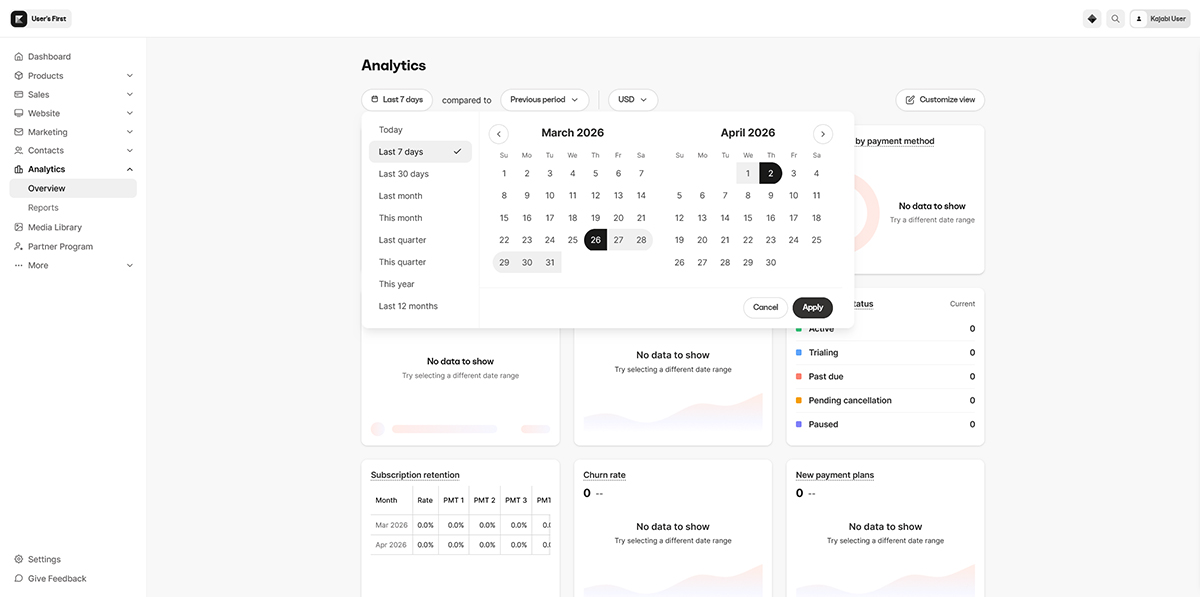
With WordPress, analytics and performance tracking are usually assembled from third-party tools (web analytics, SEO tooling, eCommerce reporting, LMS reporting). That can be more customizable, but it takes more setup and can scatter your data across platforms.
Pricing and Total Cost of Ownership
Kajabi pricing starts at $143/month with core features included if you choose annual billing, while WordPress itself can be free but typically adds recurring costs for hosting, premium themes, and paid plugins for LMS, memberships, and marketing.
Kajabi’s subscription models are straightforward: one bill that includes the essentials for building and selling digital products, and there are typically no extra transaction fees from Kajabi itself.
WordPress has a lower barrier to entry, but real-world course business stacks often require multiple paid components. That can still be cost-effective (especially if you only need a few plugins), but it can also become unpredictable. A professional WordPress stack could cost you between $90 to $125+ per month on average, and while this is slightly cheaper on paper, the $20-$50/month difference is often offset by the time you’ll spend updating plugins, troubleshooting conflicts and managing various subscriptions.
Customer Support and Troubleshooting
Kajabi offers dedicated customer support (including 24/7 live chat), while WordPress support is primarily community-driven and varies by your hosting provider, theme, and plugin vendors.
Support affects how quickly you can resolve issues during launches, outages, or payment problems. Kajabi centralizes support because the platform controls the core system.
WordPress has a huge global community and countless tutorials, but support is distributed, meaning the answer might depend on which tool in your stack is causing the issue.
Technical Aspects and Developer Token
On technical aspects, WordPress generally offers deeper developer flexibility because you can modify code, build custom plugins, and control the hosting environment. That’s ideal for teams with development resources or projects with unusual requirements.
Kajabi is more controlled by design, which can limit certain advanced customizations. For integrations and advanced functionality, platforms like Kajabi may rely on API-based workflows and (where applicable) developer credentials such as a developer token, but the overall philosophy remains.
Moving from WordPress to Kajabi: Pros and Cons
Moving from WordPress to Kajabi can simplify your stack by consolidating hosting, courses, and marketing into one platform, but migration is often a manual process (especially for blogs) because Kajabi lacks a direct import/export feature for WordPress blog content.
If you’re considering a transition, plan it like a rebuild rather than a simple site transfer. In many cases, creators keep WordPress for SEO-heavy blogging and move only the course and funnel experience to Kajabi, while others migrate everything to reduce tool overhead.
Manual Process and Website Migration
Website migration from WordPress to Kajabi is typically manual: rebuilding pages with Kajabi templates, re-uploading assets, and re-creating key conversion elements like opt-ins and sales pages. For course creators, this can still be worthwhile if it replaces multiple plugins and reduces maintenance.
Import/Export Feature and Blog Migration
Blog migration is the most common sticking point. Kajabi does not provide a direct import/export feature comparable to WordPress’s built-in export tools for posts, categories, and media, so transferring an established blog may require copying content and reformatting posts.
If organic search matters, also plan for URL structure changes and redirects. WordPress gives you granular control over permalink structures; Kajabi may require you to adapt to its URL patterns and rebuild internal links.
Benefits and Challenges of Transition
The benefits and challenges of transition usually align with your priorities: simplicity versus control. Kajabi can reduce ongoing maintenance by bundling core tools into one platform, while WordPress remains the better option when you need deep customization or a complex content architecture.
Frequently Asked Questions
Does Kajabi use WordPress?
No. Kajabi is its own hosted platform and doesn’t run on WordPress. You can still use both together (for example, WordPress for content and Kajabi for courses), but they’re separate systems that need linking and consistent branding.
Why are people moving away from WordPress?
Many creators leave WordPress to reduce maintenance work like updates, plugin conflicts, and coordinating multiple vendors for hosting, security, and marketing tools. If you’d rather pay for a managed setup than manage a stack, an all-in-one platform can feel simpler day to day.
Is WordPress still relevant?
Yes. WordPress remains a widely used option because it’s flexible and can be adapted to many business models beyond courses. It’s especially relevant for teams that want full control over hosting, custom functionality, and a tailored site architecture.
Is there a Kajabi WordPress plugin?
There isn’t a single official plugin that turns WordPress into Kajabi or fully merges the two. Most setups connect them using embeds, links, or automation tools (like Zapier), so leads and customers move cleanly between your WordPress pages and Kajabi offers.
Can I see examples of blogs built on Kajabi?
Yes. Many Kajabi sites run a blog as part of their marketing funnel, typically alongside landing pages and course sales pages. When reviewing examples, check how they structure categories, internal links, and opt-in placements to turn readers into subscribers.
Free Quiz: What's holding back your business growth?
Take this short quiz and discover your #1 growth blocker - so you know exactly where to focus next: